What is the best app to calculate stockpile volume?
The best app measures the pile with LiDAR, works out the ground underneath it, and tells you plainly how much of the pile it actually saw. Stockpile is built to do exactly that on an iPhone.
Plenty of apps can make a 3D scan. Far fewer turn that scan into a volume you can act on. When you compare apps, check these five things:
- It measures, it does not assume. LiDAR measures distance directly, so the shape comes from measured points on the pile, not from a formula for a perfect cone.
- It fits the ground. A volume is only as good as the ground it sits on. Stockpile fits the ground from a ring round the pile and shows you how well it fitted.
- It is honest about gaps. Anything the phone did not see stays out of the total, and the app shows you where the gaps are.
- It handles real yards. Piles lean on walls and sit in bays, and some jobs are a hole, not a heap. Stockpile has five modes: open pile, against a wall, in a corner, in a bay, and trench or hole.
- It gives you a report on site. Volume, tonnes, contours, a 3D model and a PDF report, sent from your phone before you leave.
No app is right for every job. For a whole quarry, dozens of piles at once, or a volume a contract depends on, a drone survey or a licensed surveyor is the better choice. There is more on that below.
How accurate is LiDAR for stockpile volumes?
It depends on the scan, and every Stockpile scan tells you how good it was. We do not quote a percentage until tests against piles of known volume back one.
The LiDAR scanner on a Pro iPhone measures distance with light, up to about five metres away. Walking a slow lap keeps the whole pile within that range, so the phone builds up measured points across the surface.
How close the volume comes to the true figure depends on the scan as much as the phone: how much of the pile was covered, how well the ground fitted, and how rough the surface is. That is why each result says how much of the pile was measured, how much was filled in, how well the ground fitted, and how much a centimetre of error in that ground would move the volume. A scan that cannot support a volume says why instead of giving one.
The capture makes the biggest difference: a slow, complete lap with a clear ring of ground round the pile gives the best result. A low, wide pile leans hardest on the ground under it, and the app says so when that matters. We will publish an accuracy figure, and how it was tested, once Stockpile has been checked against enough piles of known volume.
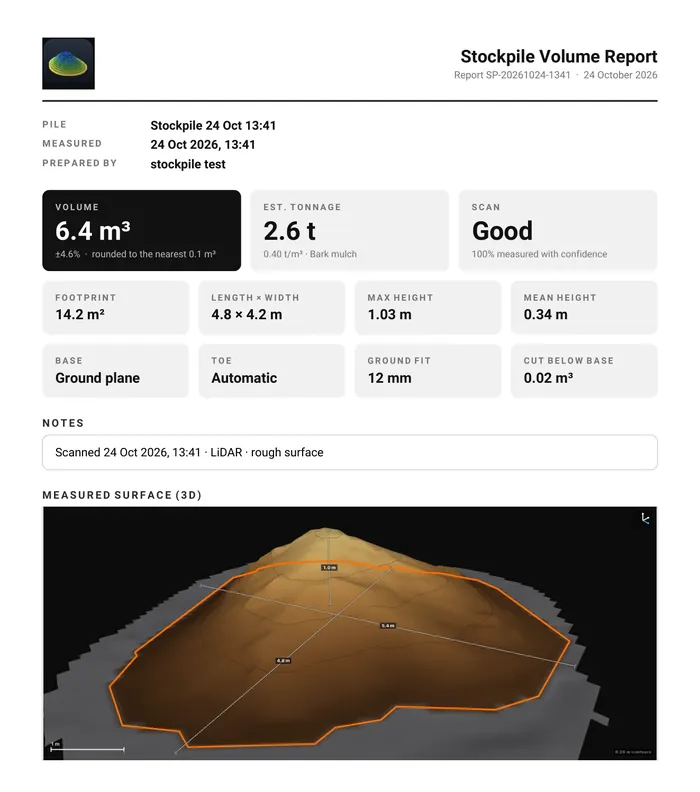
Stockpile gives indicative volumes for stock management. It is not a survey.
How does Stockpile compare to drone surveys?
A drone survey suits big sites and many piles. Stockpile suits one pile, today, with the phone already in your pocket.
Our author is a commercial drone pilot and land surveyor, so this is a fair side-by-side, not a pitch against drones.
Stockpile on a phone
- How you capture
- Walk one slow lap round the pile. No flight planning.
- Who can do it
- Anyone on site with an iPhone. No pilot certificate needed.
- Where it works
- Open piles, piles against walls, in corners and in bays, and trenches and holes. There is no flight, so no need for open sky or a calm day.
- When you get the number
- On the phone, before you leave the pile.
- Cost
- A 3-day free trial, then NZ$4.99 a month.
- Best for
- One pile or a few, checked often.
Drone survey
- How you capture
- A planned flight over the site, photographing every pile from above.
- Who can do it
- A trained pilot. In New Zealand, flights must follow Civil Aviation Authority rules (Part 101 or Part 102).
- Where it works
- Large open sites. It needs open sky and suitable weather to fly.
- When you get the number
- After the photos are processed into a 3D model, usually back at a computer.
- Cost
- Typically NZ$1,000 or more per survey.
- Best for
- Whole sites, many piles at once, and survey-grade results with ground control.
Many sites will use both: a drone or a surveyor for the figures that money depends on, and Stockpile for the quick checks in between.
What phone do I need?
Any iPhone running iOS 17 or later. For the best results, use an iPhone 12 Pro or a newer Pro model, which has the LiDAR Scanner.
On a Pro iPhone, Stockpile measures the pile with LiDAR. Other iPhones measure with the camera instead: it works, with rougher figures, and the app tells you before you start. Stockpile also runs on iPad. There is no Android version.
Not sure if your iPhone has LiDAR? Open Settings, then General, then About, and look at the model name. A Pro model from the iPhone 12 Pro onwards has it. On the back, it is the small black circle beside the camera lenses.
Frequently asked questions
Do I need an account to use Stockpile?
No. There is no account, no analytics and no tracking. Your scans stay on your phone, and a report leaves only when you send it.
Can Stockpile measure a pile against a wall or in a bay?
Yes. There are four pile modes: open pile, against a wall, in a corner and in a bay, and a fifth for trenches and holes. The app finds the walls before you start, and warns you if it cannot find one confidently.
Can it give tonnes as well as volume?
Yes. Pick one of sixteen common materials, each with a typical stockpiled density, or type your own. Tonnes are volume times density. For tonnes that have to be right, weigh one truck and use that.
How long does a scan take?
One slow lap, and a second with the phone held high if the top needs it. A gauge tells you when enough of the pile has been measured.
Is Stockpile a survey?
No. It gives indicative volumes for stock management. For volumes that money or contracts depend on, use a licensed surveyor.
Does Stockpile work on Android?
No. Stockpile is made for iPhone and iPad. There is no Android version.
When can I get Stockpile?
It is in final testing. It starts with a 3-day free trial, then costs NZ$4.99 a month. People on the waitlist hear first when it launches on the App Store.
Be first to scan a pile with Stockpile.
Stockpile is in final testing. Join the waitlist and you will hear the day it launches on the App Store.
Join the waitlistLaunch news and the odd update. Unsubscribe any time. Privacy